Chrome extension · Free · No ads
Bilingual YouTube subtitles
Twinline displays a Chinese translation below the original subtitles on YouTube in desktop Chrome. It can also translate web pages paragraph by paragraph so both languages stay visible.
Subtitles
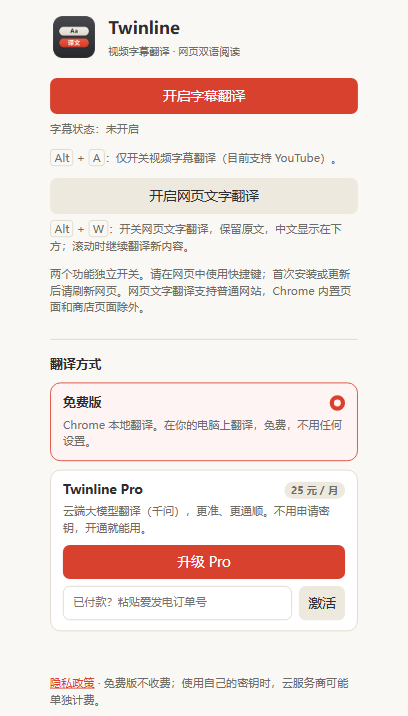
On YouTube, press Alt+A.
The Chinese translation appears together with the original subtitle and follows the video’s timing. Once the timeline is available, Twinline translates about five minutes ahead and caches what it has already translated, so playback never waits.
Drag the subtitles wherever you like; double-click to put them back. Twinline works with the foreign-language subtitles a YouTube video already has. It does not transcribe audio for videos without subtitles.
Web pages
On a foreign-language page, press Alt+W.
The original stays where it is, with Chinese below each paragraph. As you scroll, new content is translated too.
Subtitle and page translation switch on and off independently, from the keyboard or from buttons in the extension panel. Chrome’s built-in pages, the Web Store and some protected pages cannot be translated.
Translation
Free for everyday reading. Pro for accuracy.
Switch between the two at any time in the extension settings.
Free
Free
- Uses Chrome’s on-device translation, right on your computer.
- Works right after install, with nothing to set up and no API key.
- Chrome may download a language model the first time.
Twinline Pro
CNY 25 / month · CNY 198 / year
- Cloud translation by a large language model (Qwen qwen-mt-plus), more accurate and more natural.
- No API key needed. Click “Upgrade to Pro” in the settings and pay through Afdian with Alipay or WeChat Pay. Pro activates automatically once payment goes through.
- If the plan expires, the quota runs out or the server is busy, Twinline falls back to free translation and subtitles keep going.
- Already paid on Afdian? Paste the order number into the extension to activate.
Quiet
No ads, no tracking.
There are no ads and no analytics or tracking scripts. Settings and the translation cache stay on your computer.
Privacy
The free tier uploads nothing.
Free translation happens entirely on your computer. With Pro, text to be translated is sent over HTTPS to the developer’s server and passed on to Alibaba Cloud Model Studio; the server keeps neither the original nor the translation.
Side by side
The original stays. One line is added.
The translation never replaces the original. Read the Chinese when you need it; the original is right above when you want to check.
Simple
Two keys, one job each.
Alt+A handles video subtitles only and Alt+W handles page text only, so watching a video never translates the whole page.
Shortcuts
Shortcuts work on web pages, not inside text fields. After installing or updating the extension, reload pages that were already open.
Requirements and installation
- Browser: Chrome 138 or later on desktop
- Translates: from foreign languages into Simplified Chinese
- Subtitles: existing foreign-language subtitles on YouTube
- Web pages: ordinary HTTP / HTTPS pages
- Price: the free tier is free; Twinline Pro is CNY 25 a month or CNY 198 a year
Installation
Click “Add to Chrome” on the Chrome Web Store. Then click the puzzle icon in the toolbar and pin Twinline, so the settings panel is one click away.